Index >> System Utilities >> Backup & Restore >> AllSync
Report SpywareAllSync 3.5.64

 Click to enlarge screenshot
Software Description:
AllSync - Data Synchronization, Backup, Imaging, Update, Replication and Archiving
AllSync is the professional solution for your data synchronization, imaging, backup, update, replication and archiving needs under Microsoft Windows (see operating systems). AllSync supports all storage media which can be accessed via a drive letter or network path.
Various preconfigured copy modes are available for your copy tasks. A wide variety of copy options enable you to adapt the various copy modes to your individual requirements.
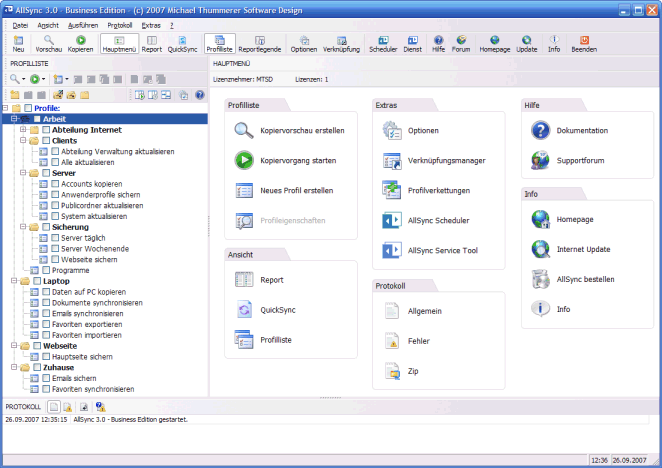
All the settings required for a specific copy procedure between two folders are stored in a profile. You can create as many profiles as you like and administer them according to project in the profile list.
AllSync also offers you the option of creating easy-to-interpret copy previews so that you get an optimal picture of the actions to be performed during a copy operation. All the actions to files and folders are conveniently displayed side by side in two report windows. The actions of the folders and files can be checked and edited by you so that the copy operation goes as you intended.
AllSync Scheduler enables you to automatically run copy operations by scheduling them. Various timing options are available for this purpose, e.g. daily, weekly, monthly, etc. AllSync Scheduler can also be installed as a Windows service, thus enabling copy operations to be automatically run when no user is logged in to the system.
There are a wide variety of filter options available to you in AllSync for excluding files and folders from a copy operation by virtue of their path, name or properties.
In the interest of data protection you can have all the files which are deleted, overwritten or moved by a copy operation first backed up to the Windows Recycle Bin or to a separate backup folder.
Other features: AllSync supports ZIP compression format, enabling space-saving backup of your data. AllSync can be invoked via the command line using various command-line options. AllSync supports the use of Windows environment variables...
What's New: Various optimizations and new enhancements have been introduced in various sections.
Limitations: 21 Days Trial
AllSync is the professional solution for your data synchronization, imaging, backup, update, replication and archiving needs under Microsoft Windows (see operating systems). AllSync supports all storage media which can be accessed via a drive letter or network path.
Various preconfigured copy modes are available for your copy tasks. A wide variety of copy options enable you to adapt the various copy modes to your individual requirements.
All the settings required for a specific copy procedure between two folders are stored in a profile. You can create as many profiles as you like and administer them according to project in the profile list.
AllSync also offers you the option of creating easy-to-interpret copy previews so that you get an optimal picture of the actions to be performed during a copy operation. All the actions to files and folders are conveniently displayed side by side in two report windows. The actions of the folders and files can be checked and edited by you so that the copy operation goes as you intended.
AllSync Scheduler enables you to automatically run copy operations by scheduling them. Various timing options are available for this purpose, e.g. daily, weekly, monthly, etc. AllSync Scheduler can also be installed as a Windows service, thus enabling copy operations to be automatically run when no user is logged in to the system.
There are a wide variety of filter options available to you in AllSync for excluding files and folders from a copy operation by virtue of their path, name or properties.
In the interest of data protection you can have all the files which are deleted, overwritten or moved by a copy operation first backed up to the Windows Recycle Bin or to a separate backup folder.
Other features: AllSync supports ZIP compression format, enabling space-saving backup of your data. AllSync can be invoked via the command line using various command-line options. AllSync supports the use of Windows environment variables...
What's New: Various optimizations and new enhancements have been introduced in various sections.
Limitations: 21 Days Trial
100% Clean:
 AllSync 3.5.64 is 100% clean
This download (AllSyncSetupDemo.zip) was tested thoroughly and was found 100% clean. Click "Report Spyware" link on the top if you found this software contains any form of malware, including but not limited to: spyware, viruses, trojans and backdoors.
Related Software:
- ! - Oops 1.02 - ! Oops ! - the independant auto-save.
- ERS 2K/XP, Emergency Recovery System FAT/FAT32 6.01 - Win 2K/XP, Recover gracefully from a system crash with ERS 2K/XP.
- ERS 9x, Emergency Recovery System 9x 11.45 - Win 95/98/ME Recover gracefully from a system crash with ERS.
- Acronis True Image Enterprise Server 8.0 - Real-time disk backup, disk imaging, and bare metal restore for Windows servers
- NH Backup 3.0.74 - Get a fast, reliable and affordable backups solution.
- DataBK SQL Server Backup 11.0.6 - Backup and restore Microsoft SQL Server database to a local or network drive.
- Outlook Express Backup Restore 2.364 - Backup your Outlook Express and restore it when it is necessary.
- Backup4all Professional 6.1.180 - Customizable backup program. Full, incremental, differential and mirror backups
- MinuteMan Data Backup Suite 8.54 - MinuteMan Data Backup with MinZip and MinSelfEx.
- Adolix Outlook Express Backup 3.0 - The easiest way to backup email data from Top Email Clients
top 10 most downloaded


recommended software
-
- AppleXsoft Photo Recovery for Mac
- AppleXsoft Photo Recovery is the comprehensive digital media data rescue software designed for Mac users, it featuring innovative photo recovery algor...
-
- Cacheman
- Memory is one of the most important pieces of computer hardware as it is in constant use no matter what a PC is used for. There is a tremendous number...